Why Computers Use a Memory Hierarchy
Understanding why computers need multiple layers of memory from registers to storage, and the SRAM vs DRAM tradeoffs that make it necessary.
Core Idea
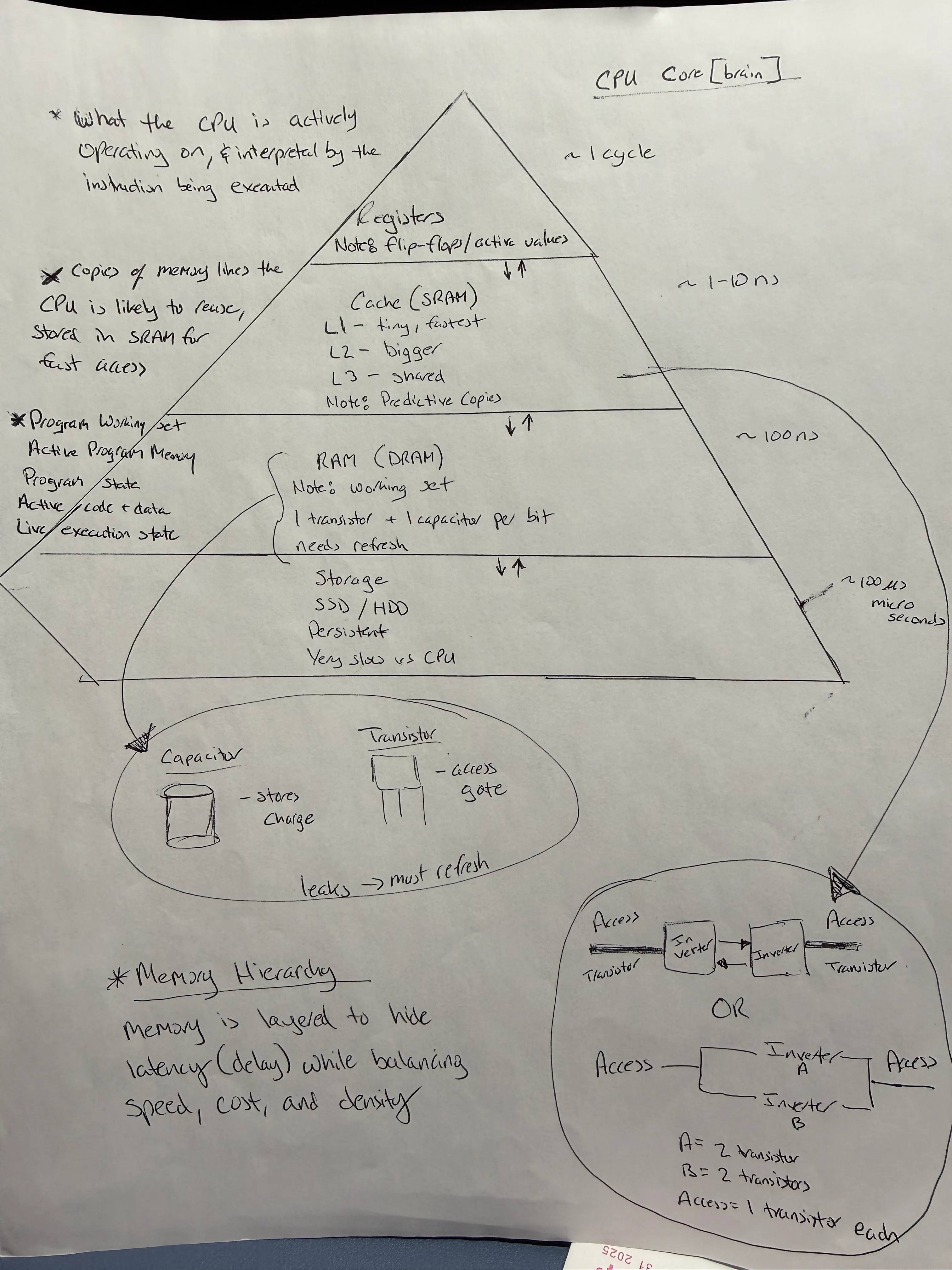
Computers use a memory hierarchy because CPUs are far faster than memory, and fast memory is expensive. The hierarchy exists to hide memory latency while keeping systems affordable. When reading “latency” think delay—it helped me, assuming this can help anyone else reading this.
Simple Analogy
- CPU → human brain
- Registers / Cache → what you’re thinking about right now
- RAM → what’s currently in your head
- SSD / HDD → books on a shelf
If every thought required grabbing a book, thinking would grind to a halt. Computers work the same way.
The Memory Hierarchy Layers
| Memory Type | Speed (Latency) | Typical Size | Cost per GB | Volatility |
|---|---|---|---|---|
| Registers | ~1 cycle (0.3 ns) | Bytes | $$$$ | Volatile |
| L1 Cache | 2-4 cycles (~1 ns) | 32-64 KB | $$$$ | Volatile |
| L2 Cache | 10-20 cycles (~7 ns) | 256 KB-1 MB | $$$ | Volatile |
| L3 Cache | 40-75 cycles (~20 ns) | 8-32 MB | $$ | Volatile |
| RAM (DDR4) | 100-200 cycles (~100 ns) | 8-64 GB | $ (~$5/GB) | Volatile |
| SSD | 10,000-100,000 cycles (~150 µs) | 256 GB-4 TB | $ (~$0.10/GB) | Persistent |
| HDD | 1,000,000+ cycles (~10 ms) | 1-20 TB | $ (~$0.02/GB) | Persistent |
Each layer exists to hide the slowness of the layer below it.
Why RAM Exists
- CPUs operate extremely fast
- Storage (SSD/HDD) is extremely slow by comparison
- RAM decouples CPU speed from storage latency
Without RAM:
- The CPU would spend most of its time waiting on I/O
- The system would be mostly idle
RAM keeps the CPU busy by holding the working set of code and data.
Why RAM Is Not Enough
Even RAM is too slow for the CPU.
To prevent the CPU from stalling:
- Computers place even faster memory closer to the CPU
- This creates multiple layers of memory
Access Time in Human Scale
If we scaled computer operations to human time:
| Operation | Actual Latency | Human Scale* |
|---|---|---|
| L1 cache reference | 0.5 ns | 1 second |
| L2 cache reference | 7 ns | 14 seconds |
| Main memory reference | 100 ns | 3 minutes |
| SSD random read | 150 µs | 3.5 days |
| HDD seek | 10 ms | 8 months |
*If L1 cache access = 1 second in human time
This shows why the CPU can’t simply wait for storage—it would be frozen for months in “CPU time.”
Why Lower Layers Cannot Replace Higher Ones
- Storage cannot replace RAM → latency is too high
- RAM cannot replace cache → still too slow for the CPU
- Cache cannot replace registers → CPU needs immediate access
The closer memory is to the CPU:
- The faster it must be
- The more expensive it becomes
SRAM vs DRAM: The Key Tradeoff
This is why cache is small and RAM is big:
| Feature | SRAM (Cache) | DRAM (RAM) |
|---|---|---|
| Speed | 1-10 ns | 50-100 ns |
| Transistors per bit | 6 transistors | 1 transistor + 1 capacitor |
| Cost per GB | Very high (~$1000+) | Low (~$5) |
| Density | Low | High |
| Refresh needed | No | Yes (every 64ms) |
| Power consumption | Higher (static) | Lower (dynamic) |
| Predictability | Consistent latency | Variable (due to refresh) |
| Typical size | KB to MB | GB |
| Best for | Speed-critical (cache) | Capacity (main memory) |
SRAM (used for registers and cache)
- Stores data using transistor states
- Extremely fast and stable
- Requires many transistors per bit (6+)
- Very expensive and space-inefficient
That’s why cache is measured in MB, not GB.
DRAM (used for RAM)
- Stores data as electrical charge in capacitors
- Capacitors leak and must be refreshed constantly
- Slower and less predictable than SRAM
- Much denser and cheaper
DRAM accepts leakage and refresh overhead in exchange for scale.
Why DRAM Is Not Used for Cache
- Cache requires extremely low and consistent latency
- DRAM has refresh cycles and higher access latency
- This unpredictability would stall the CPU
Cache must be fast every time, not just on average.
One-Sentence Summary
The memory hierarchy exists because CPUs are much faster than memory, and physics makes fast memory expensive.
Why This Matters for Modern Computing
AI and Machine Learning Workloads
- AI dramatically increases the working set size
- Models, parameters, gradients, and activations must coexist in memory
- Falling out of RAM destroys throughput
- Memory bandwidth and capacity now limit performance as much as compute
Gaming and Real-Time Applications
- Large game worlds require fast asset streaming
- Ray tracing needs quick access to scene data
- VR/AR demands ultra-low latency
Mental Model (For Recall)
- Registers → what I’m thinking this instant
- Cache → what I just thought about
- RAM → what I’m working on now
- Storage → what I might need later
What’s Next
As a next step, I’m starting to look at the physical materials that make DRAM, SRAM, and modern chips possible. Silicon—derived from quartz sand—along with advanced metals appears repeatedly. I plan to explore this more deeply in a future post.